Game Introduction
Creative Palette Junior Coloring Studio provides a digital canvas designed for young artists. The core activity involves selecting from a library of outline drawings and filling them with color. The experience is built around free expression, allowing children to choose their own color combinations and techniques. A notable aspect is the inclusion of a blank canvas mode where users can create original drawings from scratch, using a variety of digital tools. The application also supports uploading personal photographs, which are then converted into line art that can be colored. To ensure comfort during use, the interface includes a display mode that reduces brightness for darker environments. Completed projects can be saved as digital files or sent to a printer. The platform is structured to be intuitive for young users, promoting independent exploration without complex instructions. It is designed as a wholesome activity that encourages artistic development and imaginative play in a secure online setting.
How to Play
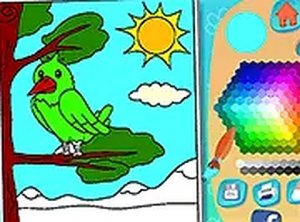
Players begin by choosing an activity: coloring a pre-made outline or starting a new drawing. For coloring, a selection of themed pages is available. The user picks a color from a palette and applies it to the desired area. Different brush widths allow for fine details or broad fills. For original drawings, a set of drawing tools is provided. To use the photo feature, an image is uploaded and automatically processed into a coloring template. The brightness adjustment option can be activated at any time. When a piece is finished, it can be saved to the device or printed. The controls are designed to be straightforward, requiring only point-and-click or tap interactions, making the game accessible to children of various ages without adult assistance.
Game Features
The game includes a wide selection of coloring pages organized by theme. A full spectrum of colors is available, along with multiple brush sizes for precise work. A dedicated drawing mode allows for freehand creation. The image upload function transforms personal photos into coloring outlines. A low-light interface mode reduces screen glare. Finished artwork can be saved locally or printed directly. The user interface is designed with large, clear buttons suitable for small hands. The platform operates entirely online without requiring downloads or installations.
Tips for Success
Encourage trying different color pairings to see how they interact. Starting with simpler outlines can build confidence before tackling more complex designs. Using the drawing mode helps develop hand-eye coordination. For uploaded images, selecting pictures with clear outlines yields the best coloring results. Activating the low-light mode in dim settings helps maintain visual comfort. Regularly saving progress prevents loss of work. Displaying completed pieces can provide a sense of accomplishment and motivate further creativity.



Comments
0 comments